Learn · Tools
AI vibe coding tools in 2026.
"Vibe coding tools" is not one category. It is a stack with four layers, and most bad tool choices come from picking the wrong layer, not the wrong product.
Vibe coding tools fall into four layers in 2026: CLI coding agents (Claude Code, Codex CLI, Gemini CLI), AI-first editors (Cursor, Windsurf, Zed), prompt-to-app builders (Replit, Lovable, v0, Bolt) and a visibility layer for watching and controlling agents (The Termi Protocol). Non-coders start at the builder layer; developers usually pair a CLI agent with an editor.
The four layers of the vibe coding stack
Every tool that markets itself for vibe coding does one of four jobs. Some do two. None do all four well:
| Layer | What it does | Leading tools | Best for |
|---|---|---|---|
| CLI agents | Autonomously read, edit and run code in your repo | Claude Code, Codex CLI, Gemini CLI, Aider, opencode | Developers, real codebases |
| AI editors | Agent power inside an IDE, code stays visible | Cursor, Windsurf, Zed, VS Code + Copilot | Developers who read along |
| App builders | Prompt to deployed app, no local setup | Replit, Lovable, Bolt, v0, Google AI Studio | Non-coders, fast prototypes |
| Visibility layer | Watch, gate, checkpoint and cost-track agents | The Termi Protocol | Anyone running agents seriously |
Layer 1: CLI coding agents
The engine room. A CLI agent runs in your terminal with permission to read files, write files and execute commands, which makes it the most capable and least supervised way to vibe code. Claude Code (Anthropic) leads on repository awareness, Codex CLI (OpenAI) on surgical speed and sandboxing, Gemini CLI (Google) on free allowance, and Aider and opencode carry the open-source flag. If you can use a terminal, this layer gives the most result per prompt; we compared all of them in detail in the best AI coding agents in 2026.
Layer 2: AI-first editors
Cursor made this category: a VS Code-shaped editor where an agent plans, edits across files and runs commands, but the code is always on screen. Windsurf pushes further on autonomous flows; Zed is the performance-obsessed newcomer; plain VS Code with Copilot now has a respectable agent mode too. Editors are the right layer when you want agent speed but intend to read what it writes, which is the healthiest default for professional work. The trade: more friction per task than a CLI agent, and you still babysit one window per project.
Layer 3: Prompt-to-app builders
The zero-setup layer. Replit turns a prompt into a running, hosted app with a database; Lovable is the fastest route to a polished web product; Bolt (StackBlitz) and v0 (Vercel) generate and preview full-stack or UI code in the browser; Google AI Studio now ships a free vibe-code playground. This is where non-programmers should start: nothing to install, deployment included. The ceiling arrives when the app grows past what the builder's abstractions expect, which is usually the moment to export the code and graduate to layers 1 and 2.
Layer 4: The visibility layer
The layer everyone discovers last, usually after an agent quietly rewrote something important. Running agents is easy; seeing them is not. Full disclosure: this layer is our product, so weigh our bias accordingly. The Termi Protocol runs the CLI agents from layer 1 side by side and turns their work into something watchable: each agent gets a desk in a 3D room, every file read, command and diff becomes a visible action, and the Command Center holds the real terminal, task board, checkpoints, memory and live per-agent cost.
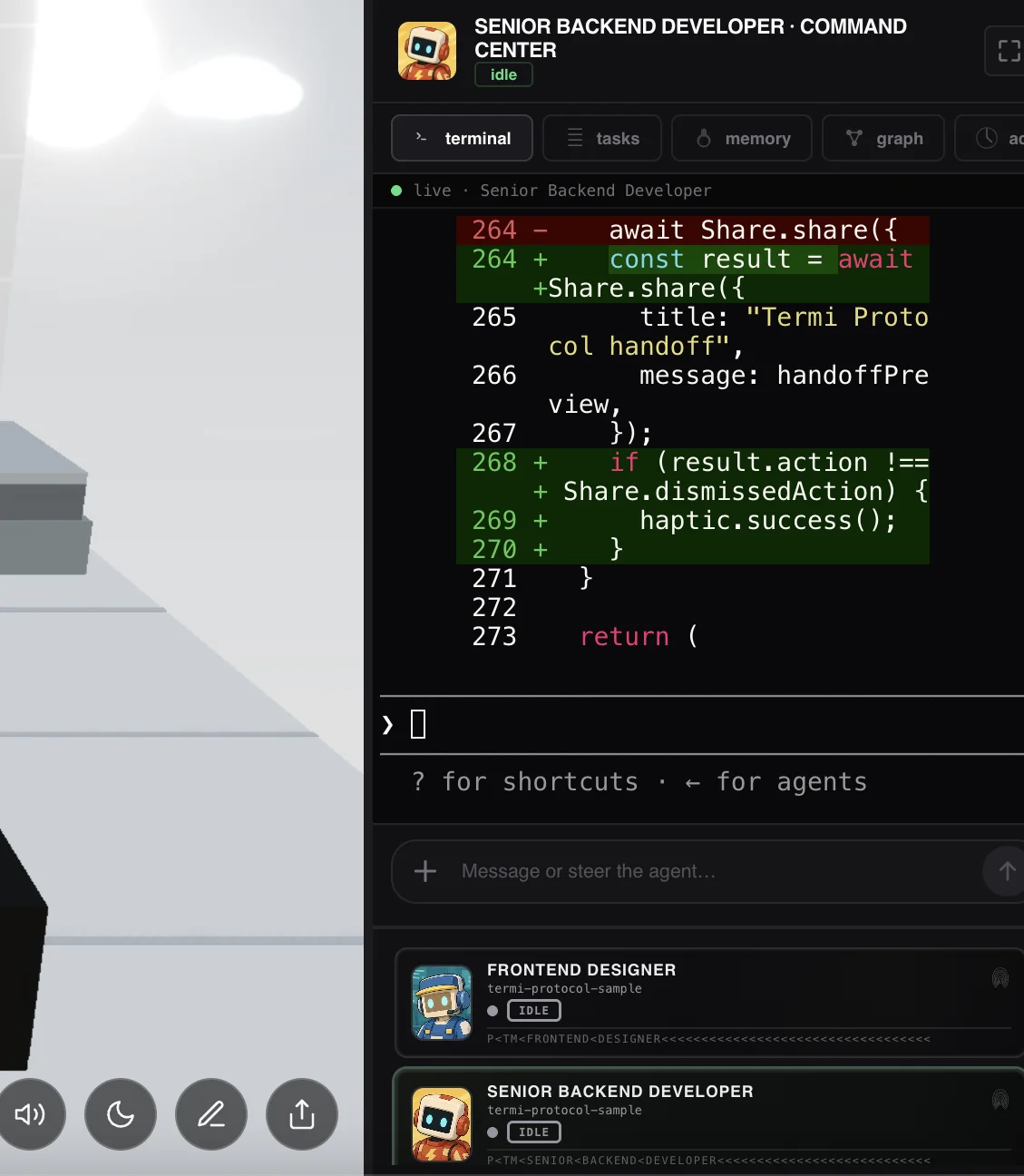
Whatever you pick for this layer, pick something. Even plain git checkpoints beat trusting a scrolling terminal you stopped reading twenty minutes ago.
The fully free stack
- Agent: Gemini CLI (free tier), or Aider / opencode with a local model via Ollama.
- Builder: Google AI Studio, or the free tiers of Replit and Bolt.
- Safety net: git, which costs nothing and forgives everything.
Expect the free stack to lag paid frontier models on hard multi-file work; for learning and small tools it is genuinely enough.
How to choose
- Never written code: start at layer 3 (Lovable or Replit). Graduate when you hit the ceiling.
- Developer, new to agents: layer 2 (Cursor) for a week, then add a CLI agent for the heavy tasks.
- Already running CLI agents: you live in layer 1; your next problem is layer 4, especially once you run more than one.
- Team lead: standardize layers 1 and 4 first; editors are personal taste, supervision is not.
The missing layer of your stack
Bring the agents you already use. Termi gives each one a desk, a live 3D view of every action, checkpoints to rewind and per-agent cost.