Learn · How-to
How to recover an accidentally closed Claude Code session.
The terminal closed, the agent was mid-task, and your stomach dropped. Good news: almost everything survives. Here is how to get it back, in Claude Code and in every other CLI agent.
Closing the terminal does not delete a Claude Code session. The transcript is saved to disk as you work. Open a new terminal in the same project directory and run claude --continue to reopen the latest conversation, or claude --resume to pick from past sessions. Your file changes are already on disk; only running processes and pending approvals are lost.
Recovering the session in Claude Code
Claude Code writes the conversation to disk continuously, under ~/.claude/projects/, scoped to the project folder you launched it from. Recovery is three commands at most:
- Go back to the project. Open a terminal and
cdinto the same directory you were working in. Session history is looked up by path. - Reopen the latest conversation. Run
claude --continue(short formclaude -c). The full history loads and the agent remembers everything that was said. - Or pick an older one. Run
claude --resumefor an interactive list of past sessions in that project. Inside a running session, the/resumecommand does the same. If you know the session id,claude --resume <id>jumps straight to it.
Two reassurances while your heart rate settles. First, the code is safe: every edit the agent made was written to your real files, so the work exists whether or not any window is open. Check git status to see it. Second, the project memory is safe: CLAUDE.md and Claude Code's saved memories live on disk, not in the window.
If the session went sideways before it closed and you want the code back too, Claude Code keeps checkpoints of file states: /rewind (or double Escape) steps the conversation and the code back to an earlier point.
What is actually lost
Being precise about the damage helps you fix it fast. A closed terminal costs you exactly three things:
- Running processes. The dev server, watcher or long test run the agent started is gone. It will need to be restarted.
- Pending approvals. If the agent was waiting for a yes on a command, that request died with the window. It will re-ask when it hits the step again.
- Situational awareness. Yours, not the model's. The resumed transcript knows what happened; the question is whether you remember what you were in the middle of deciding.
The same rescue in other CLI agents
Every serious agent has grown some version of this, with different spellings. As of July 2026:
| Agent | Resume latest | Pick a session | Where history lives |
|---|---|---|---|
| Claude Code | claude --continue | claude --resume or /resume | ~/.claude/projects/ |
| Codex CLI | codex resume --last | codex resume | ~/.codex/sessions/ |
| Gemini CLI | /chat resume <tag> | /chat list after /chat save | project temp dir; /restore with --checkpointing |
| Aider | aider --restore-chat-history | edit the history file | .aider.chat.history.md in the repo |
| opencode | opencode --continue | session list in the TUI | local app data |
| Copilot CLI | copilot --continue | copilot --resume | ~/.copilot/ (confirm with --help) |
The pattern to internalize: transcripts are cheap to persist, so everyone persists them. The recovery gap is never the chat log. It is everything around it.
Re-anchoring the agent (and yourself)
After resuming, do not just type "continue". Long transcripts resume with their context intact but their momentum gone, and an agent prodded with "continue" will sometimes re-do or un-do finished work. Two minutes of re-anchoring pays for itself:
Summarize: what were you working on, what is done,
what was in progress, and what is the next single step?
Check git status before answering.
The git status nudge matters: it forces the agent to reconcile its memory of the work with what is actually on disk, which catches the "I thought I already wrote that file" class of confusion immediately.
Never lose a session again
- Run the terminal inside tmux or screen. Free, and a closed window stops mattering: the session keeps running detached, agent and processes included.
- Keep state outside the conversation. A task list the agent maintains, notes in CLAUDE.md or AGENTS.md, and frequent git commits mean even a cold-started session re-onboards in seconds.
- Checkpoint like you mean it. Commits before and during agent sessions turn any disaster into
git checkout. - Or run the agents in a workspace built for this. This problem is one of the reasons The Termi Protocol exists: agents live at desks in a persistent room, so closing the app loses nothing. Task boards, checkpoints, each agent's project memory and full session history are saved and restored, interrupted work is flagged for recovery when you return, and even an agent you removed can be recovered from the trash with its memory intact.
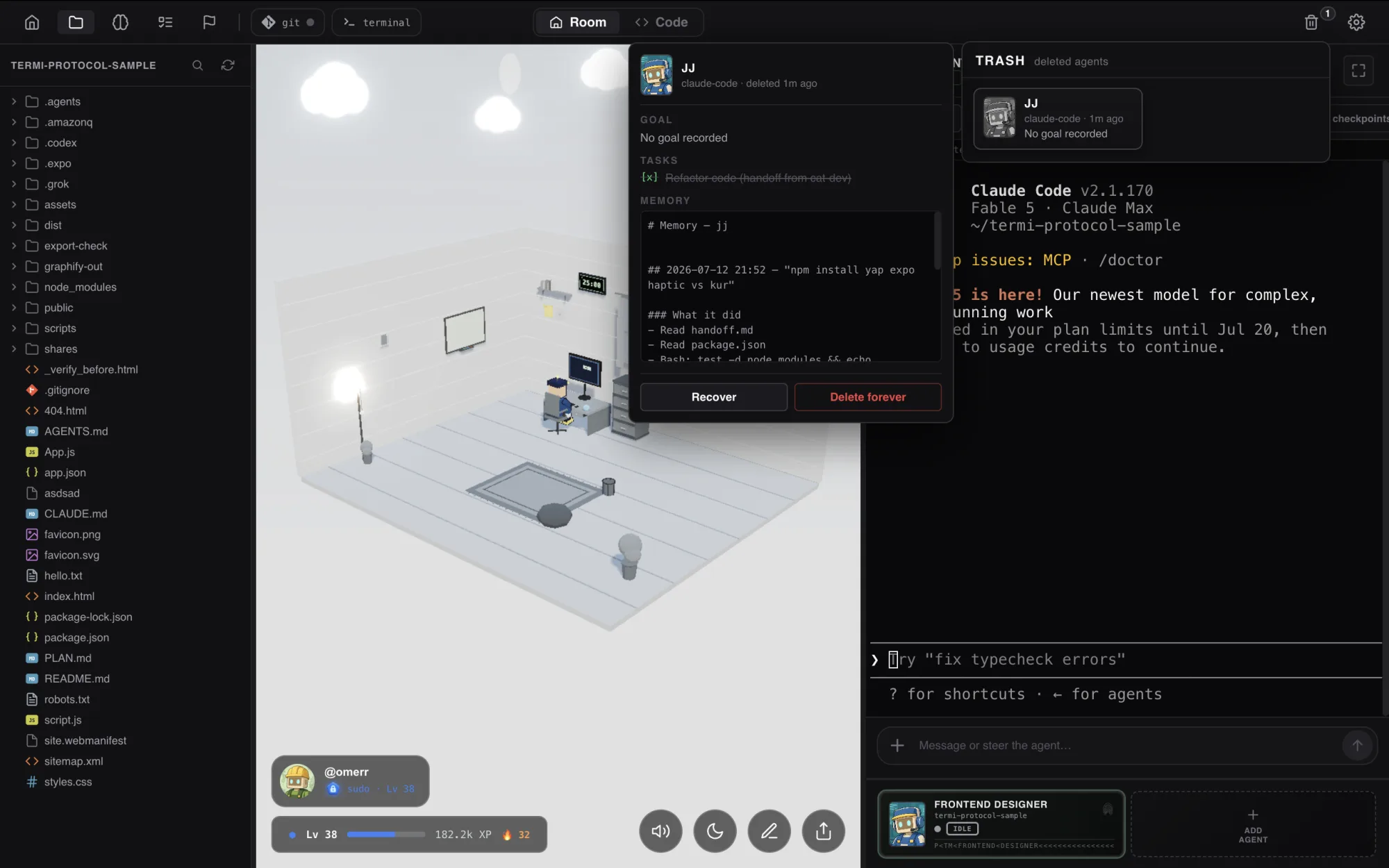
Close the app. Keep the work.
Termi persists every agent's tasks, checkpoints, memory and history between sessions, for Claude Code, Codex, Gemini CLI and any CLI agent. Reopen the room and pick up exactly where you left off.
Session recovery FAQ
Does closing the terminal delete my Claude Code session?
claude --continue to pick up the latest session.Where does Claude Code store session history?
~/.claude/projects/, in a folder derived from the project path, as JSONL transcript files. That is what --continue and --resume read from, and it never leaves your machine.Does Claude Code resume the session after a usage limit is reached?
claude --continue picks the conversation back up. If you cannot wait, hand the task to another agent; the repo, your notes and the task list carry the context across.What is the difference between claude --continue and claude --resume?
claude --continue immediately reopens the most recent conversation for the current directory. claude --resume shows a picker of past sessions so you can choose one, and also accepts a specific session id.Can I recover the code changes too, or just the chat?
/rewind.How do I resume a closed Codex CLI or Gemini CLI session?
codex resume for a session picker or codex resume --last for the most recent. Gemini CLI: save state with /chat save and restore it with /chat resume, plus --checkpointing and /restore for file states. Aider keeps .aider.chat.history.md and can reload it with --restore-chat-history.